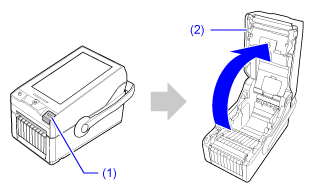
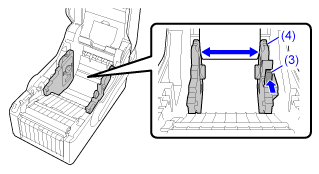
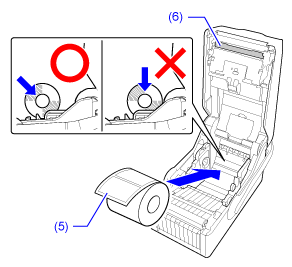
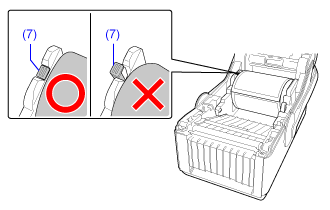
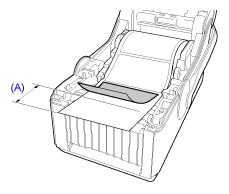
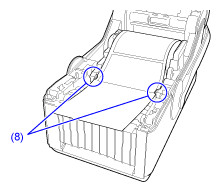
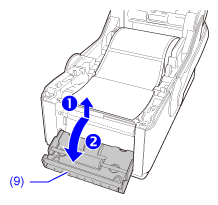
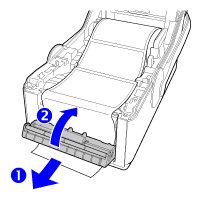
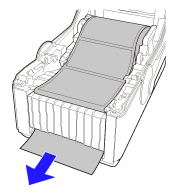
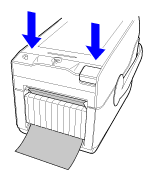
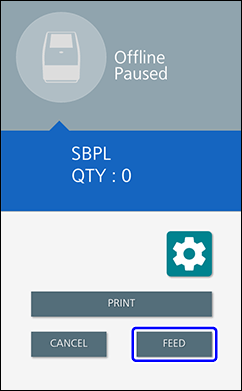
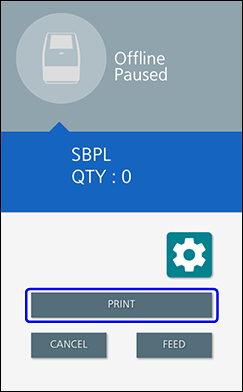
TOP > Loading Media > Loading the Media > Loading the Media Roll > Loading the Media Roll (Printing in Dispenser Mode) Loading the Media Roll (Printing in Dispenser Mode) View the video here (it has no audio). • The print head and its surroundings are hot after printing. Be careful not to get burned. • Touching the edge of the print head with your bare hand could cause injury. View the video below for the procedure. 1. Press the cover open button (1) to open the top cover (2). 2. While pushing the slide lever (3), move the media guide (4) which is on the right side to adjust its width to match the width of the media roll. • Do not load the media roll yet.• Change the flap position of the media guide in accordance with the core diameter of the media roll.3. Load the media roll. Set the media roll with the print side (5) facing the print head (6) and push it diagonally from the front.If the media roll is loaded correctly, the indicator part (7) of the media guide that moved to the side returns to its original position. • There are two wind directions for the media. The illustration is for face-out media.4. Pull out the media and peel off some labels (about 10 cm (3.94")) from the liner. (A) About 10 cm (3.94")5. Pass the media below the tabs (8). 6. Lift the dispenser frame (9) on the front of the product () and tilt it toward the front (). 7. Pass the liner through the gap (opening) between the dispenser frame and the product to the outside of the product (), and close the dispenser frame (). 8. Pull the liner lightly so that the liner or labels do not loosen. 9. Close the top cover. Push both ends of the top cover, and close it firmly until it clicks. • When closing the top cover, be careful not to pinch your fingers.10. Tap [FEED]. The media is fed to the print start position.11. Tap [PRINT] to change to Online mode. Related TopicsWinding Direction of the MediaChanging the Flap Position of the Media Guide Back to top