Loading Media
This topic explains how to load and replace media according to the options and media being used.
You can also check the procedure in the video.
- Media roll loading (standard)
- Media roll loading (standard) (Label Waste Prevention enabled)
- Media roll loading (cutter)
- Media roll loading (cutter) (Label Waste Prevention enabled)
- Media roll loading (rotary cutter)
- Media roll loading (linerless cutter)
- Fan-fold media loading (standard)
- Fan-fold media loading (standard) (Label Waste Prevention enabled)
- Fan-fold media loading (cutter)
- Fan-fold media loading (cutter) (Label Waste Prevention enabled)
- Fan-fold media loading (rotary cutter)

- Regarding available media, see Media.
- When using the cutter, depending on the type or size of the media and the operating environment, static electricity may cause the media to stick to the cutter unit and prevent it from falling.
- When using media that is 100 mm (3.93") or longer with the cutter, depending on the media type and roll direction, the leading edge of the media may get caught between the bottom of the product and the surface on which it is installed, preventing the cut media from falling out.
- To print without using a ribbon, use thermal media.
To use a dispenser unit, refer to the procedure in Loading Media (When Using Dispenser).
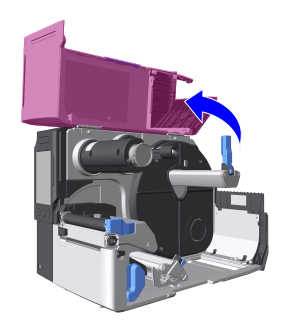
- Open the top cover.

- Open the top cover fully to prevent it from accidentally falling over.
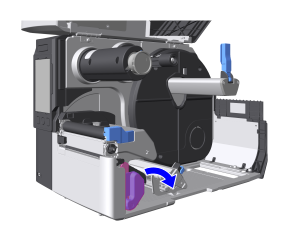
- Press the head lock lever backward.
- The print head and its surroundings are hot after printing. Be careful not to touch it, to avoid being burned.
- Touching the edge of the print head with your bare hand could cause injury.
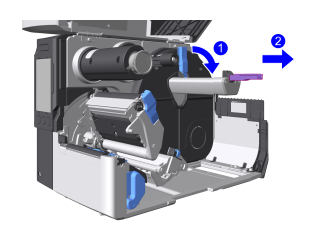
- Flip down the media roll holder guide and slide it to the tip of the media roll holder.
- Open the media guide.
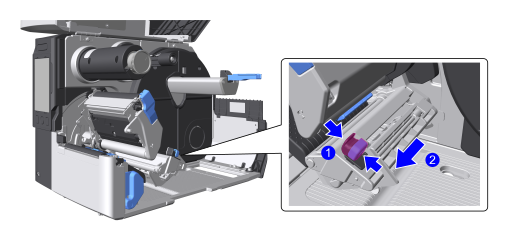
- Load the media with the print side up.
Roll Fanfold - Load it all the onto the media roll holder.
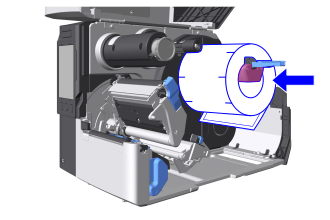
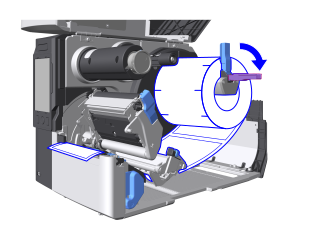
The figure shows a face-in media roll - Adjust the media roll holder guide to the width of the media and raise it up.
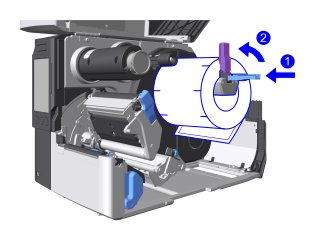
Load it from the rear or bottom of the product.
Place the fan-fold media on a flat surface.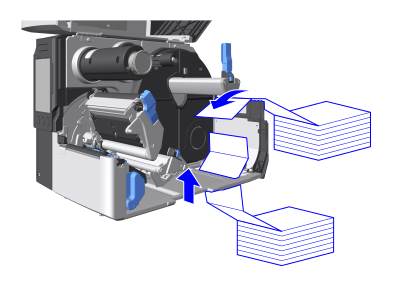

- When loading fan-fold media, be careful not to get injured when handling the media inlet.
- If frequent media jams occur when fan-fold media is loaded from the bottom, then load the fan-fold media from the rear.
- Load it all the onto the media roll holder.
- Pass the media under the damper and the media sensor guide.
The edge of the media should touch the back of the unit.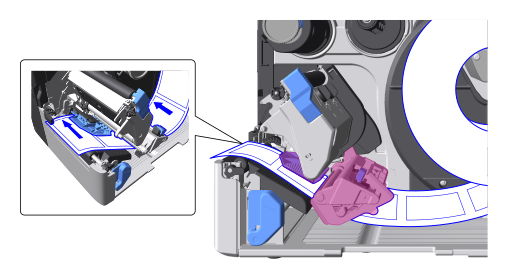
- Pass the media through the media discharge outlet.
Standard Cutter
Linerless cutter
Rotary cutter
Pass the media under the label top sensor and pull the media out until the tip of the media comes out slightly from the media discharge outlet.
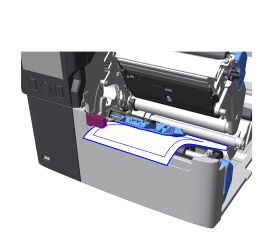
Pull the media out until the tip of the media comes out slightly from the media discharge outlet.
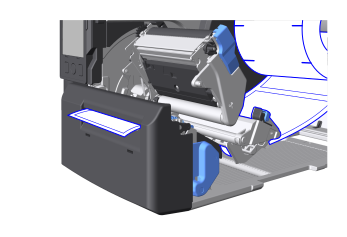
The figure shows the cutter unit
- When using the cutter, be careful not to cause injury with the cutter blade.

- When the Label Waste Prevention function is enabled, an error occurs if the leading edge of the media is too far from the correct loading position. Regarding the correct loading position, see Precautions.
- Push the head assembly downward until it "clicks" into place.
- When pushing the head assembly downward, be careful not to pinch your fingers.
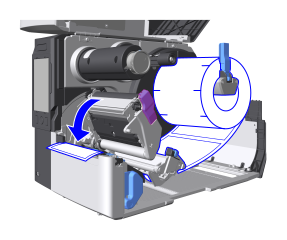
- Adjust the position of the media guide to the width of the media.
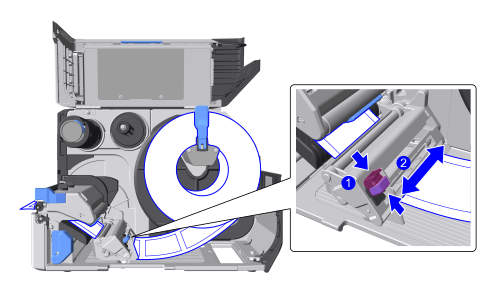
When you have finished loading the media, the path should look as shown below.Roll Fanfold 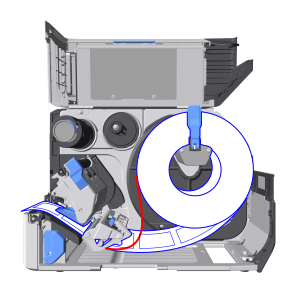

Face-in media roll

Face-out media roll
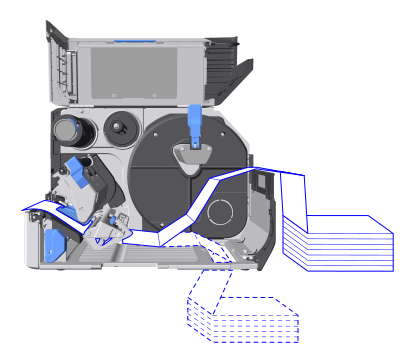
Path when loaded from the rear

Path when loaded from the bottom
- Close the top cover.
- When closing the top cover, be careful not to pinch your fingers.
- Align the media to the print start position, and switch to Online mode.
When the Label Waste Prevention function is enabledPress the
 button to have the media position adjusted automatically.
When the Label Waste Prevention function is disabledPress the
 button to feed media, then press the button to switch to Online mode.
- Always have the top cover of the product closed when using. You could get injured by touching the moving parts. Also, dust or foreign objects could get inside, possibly resulting in the product to reduced print quality, malfunctions, and failures.

- When not using the product for a long time, unplug the power cord from the outlet to maintain safety.
- Open the head assembly and remove linerless labels from the platen roller if they are not used for printing for a long period. Media jam might occur if the head assembly is closed for a long period with linerless labels loaded.
To Replace Media
- Flip down the media roll holder guide and remove the media.