Setting the Label Waste Prevention Function
Enabling the Label Waste Prevention function allows you to print on the first label by aligning the media with the print start position. This prevents the waste of media by eliminating the need to feed blank media to align positions.
[Printing] > [Advanced] > [Label Waste Prevention]
This is not displayed if the dispenser, linerless cutter or rotary cutter is being used.
Can be set if [Feed After Error] and [Feed At Power On] are disabled.

- The Label Waste Prevention function is executed at the following times.
- The first time the product changes to Online mode after being powered on
- When the product changes to Online mode after the head assembly is opened/closed
- To set up the Label Waste Prevention function for each media be used, register it as a media profile. For more information on media profiles, see Setting Media Profiles.
Initial value: Disabled
Adjusting the Label Top Sensor
With the Label Waste Prevention function, the label top sensor, which is located at the media discharge outlet, detects the leading edge of the media and aligns the media to the print start position.
If the print start position is misaligned, try adjusting the position and sensitivity of the label top sensor.
- Adjusting the Position of the Sensor
[Printing] > [Print Adjustment] > [Label Top Adjust]
For more information, see [Label Top Adjust]. - Adjusting the Sensitivity of the Sensor
[Printing] > [Advanced] > [Sensor Adjustments] > [Auto Calibration] > [Top]
For more information, see Adjusting the Media Sensor Automatically.
Restrictions
The Label Waste Prevention function cannot be used in the following conditions:
- When the dispenser, linerless cutter or rotary cutter is being used
- When using linerless labels or journal paper
- When using labels with special shapes, such as round
- When using Micro Label Print function
- When [None] is selected in [Sensor Type]
- When [I-Mark] is selected in [Sensor Type] (because the media stop position is shifted from the leading edge of the media)
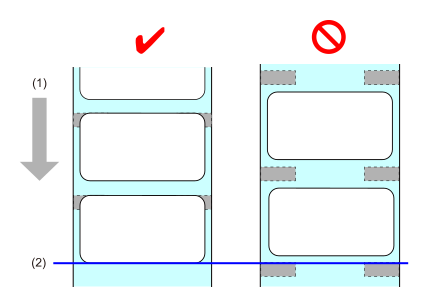
- Media feed direction
- Print head position
When using RFID tags with an inlay position less than 2 mm (0.08") from the leading edge of the media
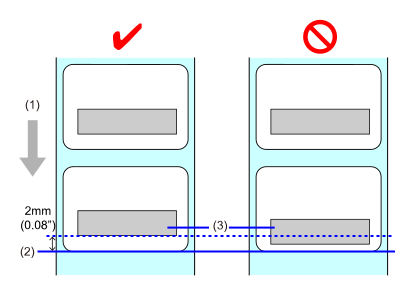
- Media feed direction
- Leading edge of the media
- Inlay
When using media with a preprint on the back side that is less than 2 mm (0.08") from the leading edge of the media and at the position that passes the label top sensor
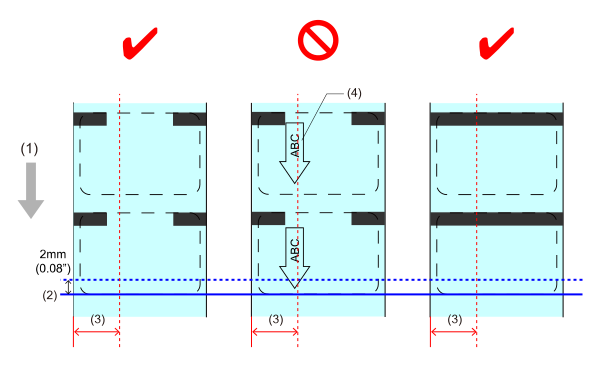
- Media feed direction
- Leading edge of the media
- Position that passes the label top sensor (standard: 8±1.5 mm (0.31±0.06"), cutter: 9±1.5 mm (0.35±0.06"))
- Example of preprinting on back side
- When using media with a gap of more than 3 mm (0.12") and [Check Media Size] is enabled
For more information on [Check Media Size], see Checking Media Sizes. - When [Option Feed] is changed
If you change [Option Feed], operation of the Label Waste Prevention function is not guaranteed, so use the initial value. For more information on [Option Feed], see [Option Feed].
Precautions
Note the following precautions when using the Label Waste Prevention function.
- Keep out of direct sunlight. This function may not operate correctly.
- Confirm that printing can be done on the first label. This function does not operate correctly if the media is torn, is cut in the middle, or if the label is peeled off so only the liner is left.
- Note the following precautions when loading media.
- Make sure there are no I-marks on the back of the liner at the leading edge of the labels.
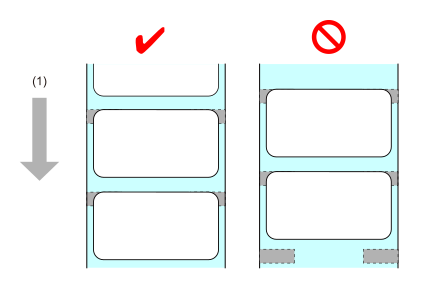
- Make sure that the length of the liner at the leading edge of the label is 1 mm (0.04") or more. If it is less than 1 mm (0.04"), the print start position could shift.
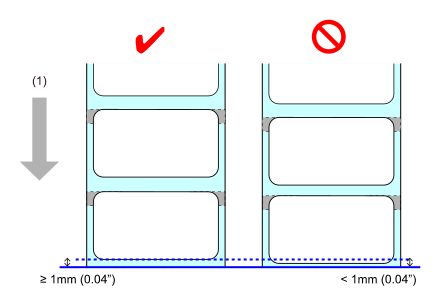
- An error occurs if the leading edge of the media is too far from the correct loading position. Align the leading edge of the media to the correct loading position.
When standard
Align the leading edge of the media with the media discharge outlet.
You can also check this in the video. (Position of leading edge of the loaded media when using Label Waste Prevention function (standard))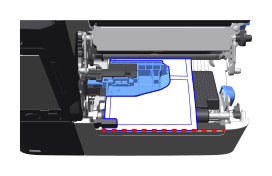
When using cutter
Position the leading edge of the media slightly ahead of the center of the platen roller (guideline: 5-10 mm (0.2-0.93")).
You can also check this in the video. (Position of leading edge of the loaded media when using Label Waste Prevention function (cutter))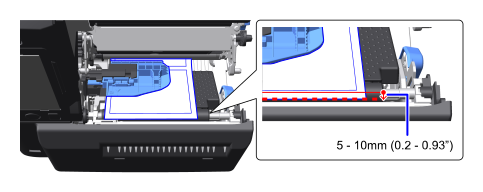
- Make sure there are no I-marks on the back of the liner at the leading edge of the labels.
- If the print data contains the starting point command ESC+#, media may fall out depending on the settings.
- When using RFID tags, if the values for [Offset], [Pitch], [Label Top Adjust] in the [Printing] > [Print Adjustment] menu, or the adjustment values set via the offset command ESC+PO are too large, writing data to the inlay may fail.
- When the head assembly is opened while the Label Waste Prevention Function is enabled, the ribbon rewind spindle may rotate to rewind used ribbon.
- When using short-length labels,*1 the product will backfeed to the print head position after printing the first label.*2 The product will operate according to the specified print mode from the second and following labels.
- Short-length labels refer to media whose length (including liner) is shorter than the distance from the label standby position to the media sensor.
- Backfeeds even in continuous operation