List of Error Messages
If an error occurs on the product, confirm the cause and countermeasures, and then take appropriate action.
Contact your SATO technical support if the error cannot be resolved.

- You cannot use an RFID tag that has caused an RFID tag error.
1001Machine Error
Cause
A defect has occurred in the product.
Countermeasures
Power on the product again.
1003Parity Error
Cause (1)
RS-232C settings are incorrect.
Countermeasures (1)
Set the interface settings of the product again.
Setting Up an RS-232C Connection
Cause (2)
The RS-232C cable is not connected correctly.
Countermeasures (2)
Power off the product, connect the RS-232C cable correctly, and then power on the product again.
1004Overrun Error
Cause (1)
RS-232C settings are incorrect.
Countermeasures (1)
Set the interface settings of the product again.
Setting Up an RS-232C Connection
Cause (2)
The RS-232C cable is not connected correctly.
Countermeasures (2)
Power off the product, connect the RS-232C cable correctly, and then power on the product again.
1005Framing Error
Cause (1)
RS-232C settings are incorrect.
Countermeasures (1)
Set the interface settings of the product again.
Setting Up an RS-232C Connection
Cause (2)
The RS-232C cable is not connected correctly.
Countermeasures (2)
Power off the product, connect the RS-232C cable correctly, and then power on the product again.
1006Buffer Overflow
Cause
- The size of the received data from the host exceeds the size of the receive buffer.
- The interface settings between the product and the host are incorrect.
- When using LPR or FTP communication, it is recommended that the data size per transmission be limited to 30MB or less.
Countermeasures
Change the settings on the host so that data that exceeds the size of the receive buffer cannot be sent.
1007Head Open
Cause
- The head assembly is not locked.
- The sensor for detecting the open/close status of the head assembly is defective.
Countermeasures
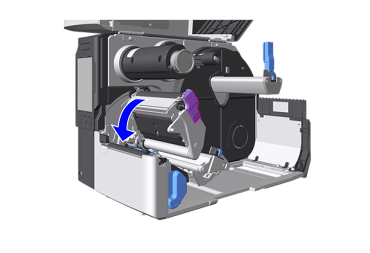
Lock the head assembly.
If the head assembly is already locked, unlock it and then lock it again.
- Press the head lock lever backward.
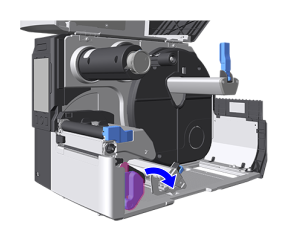
- Push the head assembly downward until it "clicks" into place.

- When pushing the head assembly downward, be careful not to pinch your fingers.
- The print head and its surroundings are hot after printing. Be careful not to touch it, to avoid being burned.
1008Out of Paper
Cause (1)
- The media is not loaded.
- The media is not loaded correctly.
Countermeasures (1)
Load the media correctly.
Loading Media
Cause (2)
The media sensor level is not set correctly.
Countermeasures (2)
Adjust the media sensor level.
Adjusting the Media Sensor Automatically
1009Ribbon End
Cause (1)
- The ribbon is not loaded.
- The ribbon is not loaded correctly.
Countermeasures (1)
Load the ribbon correctly.
Load the Ribbon (When Printing by Using a Ribbon)
Cause (2)
The ribbon is ripped.
Countermeasures (2)
Clean the ribbon's route and load the ribbon correctly.
Cleaning When Using Standard/Cutter
Load the Ribbon (When Printing by Using a Ribbon)
1010Media Error
Cause (1)
The media size of the print data is longer than the actual media size.
Countermeasures (1)
- Check the media size of the print data and the actual media size again.
- Specify different print data.
Cause (2)
The media is fed a longer distance due to the incorrect sensor level.
Countermeasures (2)
Adjust the media sensor level.
Adjusting the Media Sensor Automatically
- The media error appears when Check Media Size is set to Enabled.
1012Head Error
Cause
- A malfunction has occurred at the print head.
- The print head is worn or damaged.
Countermeasures
- Change the setting of [Advanced] > [Head Check] > [Head Check] in the [Printing] menu to [Barcode]. Adjust the settings so that the areas that cannot be printed are the white lines of the barcode.
Checking for Broken Elements in the Print Head - Replace the print head.
Replacing the Print Head

- For labels output after this error occurred, use a scanner or other device to read and confirm the printed barcodes.
- To force this error to clear and resume printing, tap
 in the upper-left, confirm the displayed message, and then tap [Unlock].
1015Cutter Error
Cause (1)
A media jam has occurred in the cutter.
Countermeasures (1)
Remove the jammed media from the cutter.
Refer to the video for loading the media, for the media path, and for the operation of each part inside the product.
List of the Guidance Videos
- Be careful not to cause injury with the cutter blade when removing the media.
Cause (2)
The cutter blade does not return to the specified position.
Countermeasures (2)
Tap [Cutter] and return the cutter blade back to the specified position.
1017SBPL Command Error
Cause
Incorrect command or parameter in the print data.
Countermeasures
Check the print data.
Error details are displayed in the format "aa-bbb: cc".
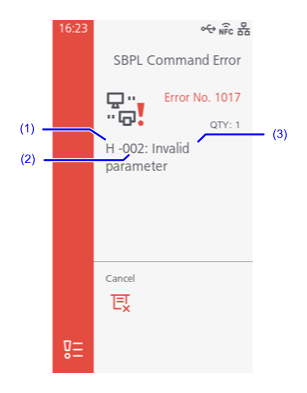
- aa: Error command name
- bbb: Location of error occurrence
Indicates the number of ESC commands (up to 999 are shown) from the data transmission start code command ESC+A. (Note that the start code command ESC+A is not included in the number.)
Example: When a command error is detected by the horizontal print position command ESC+H.
------: [ESC]A
001: [ESC]V100
002: [ESC]H99999
003: [ESC]L0202
004: [ESC]M,ABCDEF
005: [ESC]Q1
006: [ESC]Z
In this case, 002 is the location of the error. - cc: error content
- Invalid command
- Invalid parameter
- Command table read error
- Invalid graphic data/custom designed data
- Invalid registration area
- This number is already registered
- Over registration area limit
- Data is not registered
- Printing position is out of printable area
- Barcode image is out of printable area
- PDF417 is specified incorrectly
- Error in generating QR code
- ETX not detected
1019RFID System Error
Cause
RFID module is not operating correctly.
Countermeasures
Repair or replacement of the RFID module is required. Contact your SATO technical support.
Contact Information
- The RFID module is not functioning properly, so data cannot be written to or read from the inlay, but printing on the surface of the tag is possible.
1020Calendar Error
Cause (1)
The date and time of the calendar are incorrect.
Cause (2)
The battery for the calendar is running low.
Countermeasures (2)
The battery for the calendar needs to be changed. Contact your SATO technical support.
Contact Information
1021BCC Check Error
Cause
The BCC code of the transmitted data (one item) is incorrect.
Countermeasures
Check transmitted data and interface settings.
- Send the CAN command to cancel the print data where this error occurred and continue printing from the next item.
1022Print Head Overheated
Cause
The temperature of the print head has exceeded its tolerance value.
Countermeasures
Stop the operation of the product to let the temperature decrease.
1023NTP Error
Cause (1)
Could not connect to the time server and set the clock.
Countermeasures (1)
Confirm that the address of the time server is correct.
Setting the Functions for NTP
Cause (2)
The network settings are incorrect.
Countermeasures (2)
Check the interface settings.
Setting Up Connections
Cause (3)
There is a network failure.
Countermeasures (3)
- Check the communication environment.
- Disable the NTP function and then in the [System] menu set the date & time manually.
Setting the Date and Time
1024Head Density Changed
Cause (1)
The print head is not installed.
Countermeasures (1)
Install the print head.
Replacing the Print Head
Cause (2)
A new print head with a different resolution has been installed.
Countermeasures (2)
- After a new print head with a different resolution has been installed, tap [Apply].
Replacing the Print Head - Install a print head with the same resolution as the old print head.
Replacing the Print Head
1028Gap Not Found
Cause (1)
Meandering media.
Countermeasures (1)
Clean the media path and reload the media correctly.
Cleaning When Using Standard/Cutter
Cleaning When Using the Linerless Cutter
Loading Media
Cause (2)
The media sensor type is incorrect.
Countermeasures (2)
Set the media sensor type which is compatible with the media you use.
Change the Media Sensor Being Used
Cause (3)
The media sensor level is incorrect.
Countermeasures (3)
Adjust the media sensor level.
Adjusting the Media Sensor Automatically
1035I-mark Not Found
Cause (1)
Meandering media.
Countermeasures (1)
Clean the media path and reload the media correctly.
Cleaning When Using Standard/Cutter
Cleaning When Using the Linerless Cutter
Loading Media
Cause (2)
The media sensor type is incorrect.
Countermeasures (2)
Set the media sensor type which is compatible with the media you use.
Change the Media Sensor Being Used
Cause (3)
The media sensor level is incorrect.
Countermeasures (3)
Adjust the media sensor level.
Adjusting the Media Sensor Automatically
1046EAP Authentication Error (EAP Failure)
Cause
- EAP Authentication failure.
- Wi-Fi settings are incorrect.
Countermeasures
Confirm and set the Wi-Fi settings again.
Setting Wireless LAN Connections Manually
1047EAP Authentication Error (EAP Timeout)
Cause
Accesspoint and authentication server settings do not match.
Countermeasures
Use the correct accesspoint and authentication server settings.
Setting Wireless LAN Connections Manually
1050Bluetooth Error
Cause (1)
Failed to communicate with Bluetooth module.
Countermeasures (1)
Confirm and set the Bluetooth settings again.
Setting Up a Bluetooth Connection
Cause (2)
A malfunction was detected in the Bluetooth module.
Countermeasures (2)
The Bluetooth module needs to be repaired. Contact your SATO technical support.
Contact Information
1058CRC Check Error
Cause
- CRC has not been added to the data.
- CRC does not match.
Countermeasures
Check transmitted data and interface settings.
1066Paper Jam
Cause (1)
- Media is wrapped around the platen roller.
- Media jam occurred during linerless operation.
Countermeasures (1)
- Remove the jammed media.
Refer to the video for loading the media, for the media path, and for the operation of each part inside the product.
Loading Media - Clean the media path and reload the media correctly.
Cleaning When Using Standard/Cutter
Cleaning When Using the Linerless Cutter
Loading Media
Cause (2)
The media is not loaded correctly.
Countermeasures (2)
Confirm how to load the media and then reload it correctly. Load the media so its leading edge is further forward than the cutter blade.
Loading Media
1068Wi-Fi Error
Cause
The wireless LAN module is damaged.
Countermeasures
- Confirm and set the Wi-Fi settings again.
Setting Wireless LAN Connections Manually - The wireless LAN module needs to be replaced. Contact your SATO technical support.
Contact Information
- If this error occurs when starting up, please reboot the product.
1073RFID Undetected Warning
Cause
A print job that does not have an RFID command was transmitted when RFID tags were loaded and [Undetected Warning] was enabled.
Countermeasures
- Add an RFID issue command to the print job.
- Disable [Undetected Warning].
[RFID] > [Undetected Warning] - Replace with normal media.
1075NFC Error
Cause
The NFC module is not operating correctly.
Countermeasures
A replacement of the NFC module is required. Contact your SATO technical support.
Contact Information
1076Invalid command in NFC
Cause
A command error occurs and the settings are not saved correctly.
Countermeasures
Check the command.
1077Barcode Reader Connection Error
Cause
- The scanner connection could not be confirmed.
- Communication between the scanner and the product failed.
Countermeasures
Check the state of connections with the scanner and product.
For RS-232C connections, do the following procedure to reconnect the scanner:
- Tap
in the upper left.
- In the [Printing] menu, set [Advanced] > [Barcode Checker] > [Mode] to [Disabled], then set either [Comparison] or [Readable].
- If you do not want to use the barcode check function, then tap
in the upper left, and in the [Printing] menu, set [Advanced] > [Barcode Checker] > [Mode] to [Disabled].
Settings to Check Reading of Barcodes
1078Barcode Reading Error
Cause
- A barcode could not be read normally.
- The result of reading a barcode does not match the print data.
Countermeasures
- Check the print layout.
- Check the position and settings of the scanner.
Settings to Check Reading of Barcodes
1079Barcode Reading Error (Check Start Position Fault)
Cause
A value greater than the length of the loaded media is set for the check start position.
Countermeasures
- Check the print layout.
- Set the check start position to a value smaller than the length of the loaded media.
Start Position
1080Barcode Comparison Error
Cause
- A barcode could not be read normally.
- The result of reading a barcode does not match the print data.
Countermeasures
- Check the print layout.
- Check the position and settings of the scanner.
Settings to Check Reading of Barcodes
1111Label Waste Prevention Error
Cause (1)
The position in which the media is loaded is incorrect.
Countermeasures (1)
Check the position in which the media is loaded.
Precautions
Cause (2)
The correct media that match the settings is not set.
Countermeasures (2)
Adjust the media sensor level.
Adjusting the Media Sensor Automatically
Cause (3)
The label top sensor is malfunctioning.
Countermeasures (3)
Contact your SATO technical support.
Cause (4)
The media sensor is dirty or the sensor level does not match the media.
Countermeasures (4)
- Clean the media sensor.
Cleaning When Using Standard/Cutter - Adjust the media sensor level.
Adjusting the Media Sensor Automatically - Replace the media sensor. Contact your SATO technical support.
Contact Information
Cause
Did not find the tag, or failed to read the tag.
Countermeasures
Check the product and antenna settings, and the inlay.
Setting Read/Write Information
Cause
Failed to write the inlay.
Countermeasures
Check the product and antenna settings, and the inlay.
Setting Read/Write Information
1116Failed to read the tag data.
Cause (1)
Failed to read the tag by using the tag data print command ESC+TU.
Countermeasures (1)
Check the product and antenna settings, and the inlay.
Setting Read/Write Information
Cause (2)
Failed to replace the read tags.
Countermeasures (2)
Confirm that an address that exceeds the inlay volume has not been specified.
Cause (only ISO/IEC 15693, FeliCa)
- Tried to write to a write-locked inlay.
- Tried to write to an address to which writing is impossible.
Countermeasures
Use tags that are not locked.
1118Write/Read values are not consistent
Cause (except FeliCa)
The written value and read value do not match.
Countermeasures
Check the product and antenna settings, and the inlay.
Setting Read/Write Information
Cause (only FeliCa)
The written value and read value do not match. A value greater than original data was written to subtraction register.
Countermeasures
Write an appropriate value to subtraction register.
Cause
Failed to lock the inlay.
Countermeasures
Check the inlay.
Cause (only ISO/IEC 15693, ISO/IEC 14443 Type A)
Read the UID of a tag other than the specified tag.
Countermeasures
Check that the tags that were set are being used.
1121Multiple tags are detected.
Cause (except FeliCa)
Multiple inlays captured at same time.
Countermeasures
Check the product and antenna settings, and the inlay.
Setting Read/Write Information
Cause (only FeliCa)
The IDms of the cards captured between processes are not the same (tried to write unintended card).
Countermeasures
Check the product and antenna settings, and the inlay.
Setting Read/Write Information
Cause (1)
Tried to write to a write-locked inlay.
Countermeasures (1)
Use tags that are not locked.
Cause (2)
Tried to write to an inlay when the writing power is low.
Countermeasures (2)
Adjust [Write Power]/[Read Power].
[RFID] > [Write Power] / [Read Power]
Cause (only ISO/IEC 15693, ISO/IEC 14443 Type A)
Incorrect tag type is specified.
Countermeasures
Check the tag type, and specify the correct tag type.
Cause (only ISO/IEC 15693, ISO/IEC 14443 Type A, FeliCa)
Failed to acquire the ID.
Countermeasures
Check state of the signal.
Cause
The [RSSI Filter] is enabled, and the RSSI value of the inlay is lower than the value set in [Threshold].
Countermeasures
- Check the tags. Or, check the [Threshold] settings.
- Adjust [Write Power]/[Read Power].
[RFID] > [Write Power] / [Read Power]
1129Unsupported tag error

Cause (only ISO/IEC 15693, ISO/IEC 14443 Type A, FeliCa)
Unsupported tag types or non-writable encoded tags are being used.
Countermeasures
Check the manufacturer and model of the inlay.
Cause (only ISO/IEC 15693)
Tried to write to an address that was outside the range of the enabled memory bank.
Countermeasures
- Confirm that an address that exceeds the inlay volume has not been specified.
- Check the data size.
1132RTC module error
Cause
The RTC module or the RTC module's connection port is damaged.
Countermeasures
The RTC module or some part of the product needs to be replaced. Contact your SATO technical support.
Contact Information
1134RFID Module Overheated

Cause
The temperature of the RFID module has exceeded its tolerance value.
Countermeasures
Stop the operation of the product to let the temperature decrease.
1135Unsupported Option Error
Cause
- The current option configuration does not support the rotary cutter.
- The selected option configuration is not supported.
Countermeasures
Contact your SATO sales representative.
1142Host Receive Error
Cause
The host failed to receive data.
Countermeasures
Power off the product and check the host's receiving settings.
1144RFID Label Pitch Size Error
Cause (1)
A value exceeding the RFID tag size was set for the tag offset and printed.
Countermeasures (1)
- Open the head assembly and check the RFID tag.
- Correctly reset the RFID tag pitch size and tag offset.
Cause (2)
A value exceeding the tag offset setting was set in [Pitch] and printed.
Countermeasures (2)
- Open the head assembly and check the RFID tag.
- Correctly adjust [Pitch] and reset the tag offset.
Cause (3)
Printing was performed using an RFID command without the first media being fed.
Countermeasures (3)
Feed the first media before printing.
1147EXT Connector Error
Cause
- There is a shorted connection at the EXT connector.
- There is a problem with the external device connected to the EXT connector.
Countermeasures
- Power off the product and check the connection of the EXT connector.
- Remove any dirt from the EXT connector connections.
- Connect a different external device.
1148Cutter Connector Error
Cause
There is a shorted connection at the cutter unit power supply connector.
Countermeasures
- Remove any dirt from the cutter unit connections.
- Replace the cutter unit. Contact your SATO technical support.
Contact Information
1151Printhead Error
Cause
The print head is not installed correctly.
Countermeasures
Power off the product, and install the print head correctly.
Replacing the Print Head
- If this error occurs when starting up, please reboot the product.
1152USB Overcurrent Error
Cause
An overcurrent has been detected at the USB port.
Countermeasures
- Power off the product, disconnect and then reconnect the USB connector.
- Remove any dirt from the USB port.
1153RFID Print Settings Error
Cause
The print settings are such that RFID printing cannot be executed.
Countermeasures
Change the print settings and RFID settings.