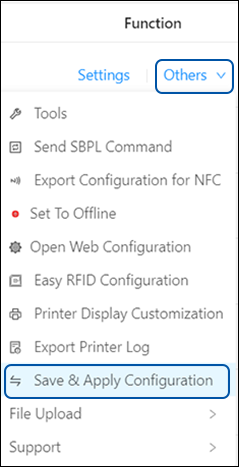
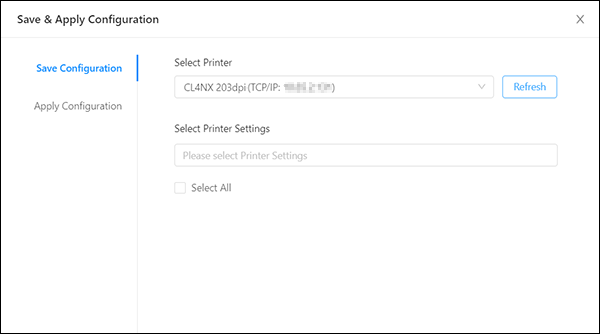
TOP > Various Menus of the Application > The [Others] Menu > Saving and Applying Configuration Saving and Applying Configuration Saving the Configuration File Applying the Saved Configuration File to the Printer This feature is especially helpful when transferring printer configurations from a CL4NX/CL6NX/CL4NX-J/CL6NX-J/CL4NX Plus/CL6NX Plus/CL4NX-J Plus/CL6NX-J Plus series printer to one or multiple CL4-SXR/CL6-SXR series printers with the same media size and print resolution. It reduces repetitive setup tasks and saves time. • Note: You must log in to All-In-One Tool to access this feature. For more information, refer to Signing Up/Logging In. Users can save their preferred printer settings as a configuration file and apply it to one or multiple printers simultaneously. The following table shows compatible source and target printer models for configuration transfer: Source Printer Printer Resolution Target Printer Printer Resolution CL4NX, CL4NX-J, CL4NX Plus, CL4NX-J Plus 203 dpi CL4-SXR 203 dpi 305 dpi 305 dpi 609 dpi 609 dpi CL6NX, CL6NX-J, CL6NX Plus, CL6NX-J Plus 203 dpi CL6-SXR 203 dpi 305 dpi 305 dpi CL4-SXR 203 dpi CL4-SXR 203 dpi 305 dpi 305 dpi 609 dpi 609 dpi CL6-SXR 203 dpi CL6-SXR 203 dpi 305 dpi 305 dpi On the printer page, click [Others] > [Save & Apply Configuration] of the selected printer. The [Save & Apply Configuration] dialog is shown. Saving the Configuration File Applying the Saved Configuration File to the Printer Related Topics The [Others] Menu The [Tools] Menu The [Settings] Menu