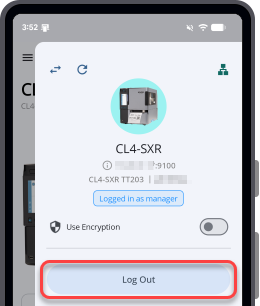
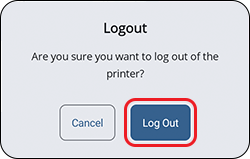
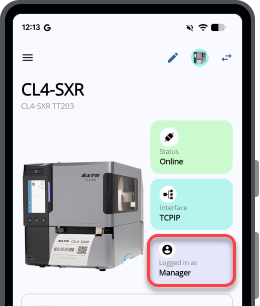
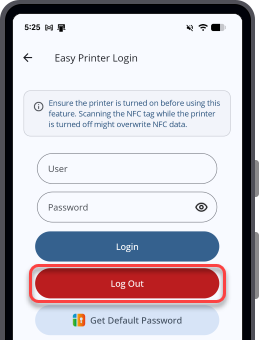
TOP > Getting Started > Printer Login > Log Out of the Printer Log Out of the Printer You can log out of the printer using one of the following methods: Log Out of the Printer When the Printer Is Added to the Printer List Use this procedure when the target printer has already been added to the printer list. • On the Printer Connection and Access panel, tap [Logout]. A confirmation dialog appears. Tap [Logout] to log out. • On the Printer Dashboard, tap the login status button. A confirmation dialog appears. Tap [Logout] to log out. Log Out of the Printer From [Easy Printer Login] Use this procedure to log out of a printer through NFC. Prerequisites: • Make sure that NFC is turned on for the Android device. NFC is always on for iPhone. • Make sure the target printer is powered on, NFC is enabled, and Power Save Mode is disabled. 1. On the [Home] page, tap [Easy Printer Login]. 2. Tap [Logout]. 3. Hold the Android device or iPhone close to the printer's NFC antenna. The NFC antenna location is marked with a symbol. A dialog appears when you successfully log out from the printer. Related Topics Printer Login Log In to the Printer Using the NFC Interface Easy Printer Login Log In to the Printer When the Printer Is Added to the Printer List


 symbol.