TOP > Getting Started > Adding Printers to the Printer List
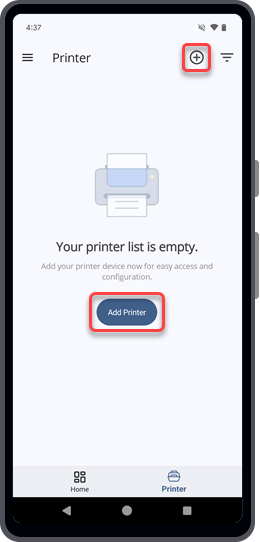
On the [Printer] page, tap on the upper right corner to show the [Add Printer] screen.
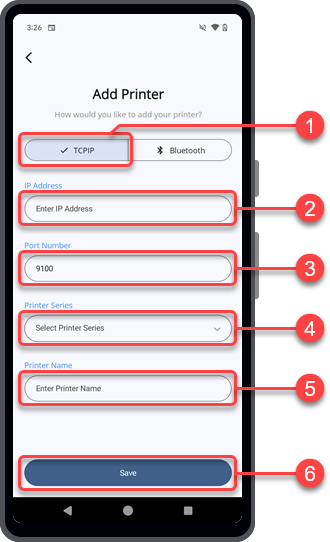
Adding a Printer Connected via TCP/IP (LAN/Wi-Fi) Interface
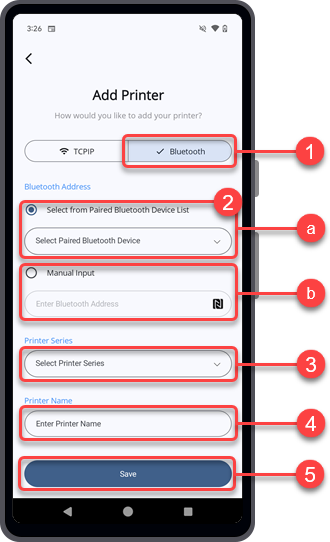
Adding a Printer Connected via Bluetooth Interface (For Android Device)
1.
Tap [Bluetooth].
(a) [Select from Paired Bluetooth Device List]
Tap [Select from Paired Bluetooth Device List], then select the paired printer from the drop-down list.
(b) [Manual Input] the Bluetooth Address
Tap [Manual Input] and enter the Bluetooth address manually.
Alternatively, tap the icon and hold the Android device near the printer's NFC antenna to obtain the Bluetooth address automatically. The Bluetooth address is captured and saved.
When [Use Encryption] is turned on, the [Bluetooth Encryption] dialog appears.
5.
Tap [Search].
If the printer is detected, the printer series and printer name fields are filled in automatically. You can change the printer name later in step 7.
If the printer is not detected, you can manually select the printer series and enter the printer name to add the printer as a disconnected printer.
8.
Tap [Save].
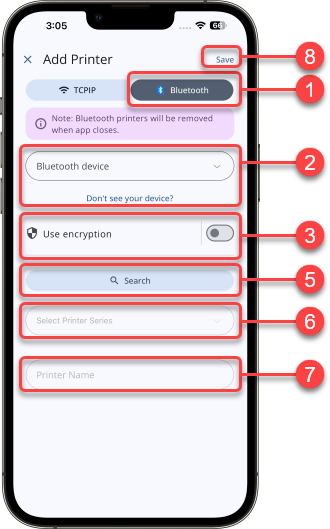
Adding a Printer Connected via Bluetooth Interface (For iPhone)
Make sure the printer’s Bluetooth authentication level is set to Level 4 to support pairing with an iPhone.
1.
Tap [Bluetooth].
2.
Tap the [Bluetooth device] drop-down list, then select the paired printer you want to add.
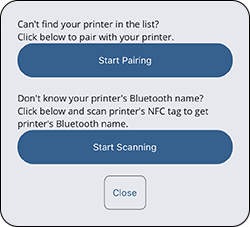
Alternatively, tap [Don't see your device?] for additional help.
Tap [Start Pairing] to pair the printer.
To find the Bluetooth name of the printer, tap [Start Scanning], then hold the iPhone near the printer’s NFC antenna.
When [Use Encryption] is turned on, the [Bluetooth Encryption] dialog appears.
5.
Tap [Search].
If the printer is detected, the printer series and printer name fields are filled in automatically. You can change the printer name later in step 7.
If the printer is not detected, you can manually select the printer series and enter the printer name to add the printer as a disconnected printer.
8.
Tap [Save].
Bluetooth printers added on an iPhone are removed from the [Printer] list when the application closes.
 

Top

Back