SATO

MENU

How to Search

MENU

  • TOP (Table of Contents)
  • Introduction
  • Getting Started
  • Adding Printers to the Printer List
  • Logging in to the Printer
  • Navigating the Application
  • Various Functions of the Application
  • View in PDF
Mobile SATO All-In-One Tool V2 User Manual
Close
TOP > Getting Started > Logging in to the Printer
Logging in to the Printer
The application includes a printer login feature for an additional layer of security. Before performing any printer operations, users must log in.
The following procedure explains how to log in using either the factory-provided password or a SATO ID AUTH account.
 
•
This feature is available only on selected printer models. For details, refer to Supported Models.
1.
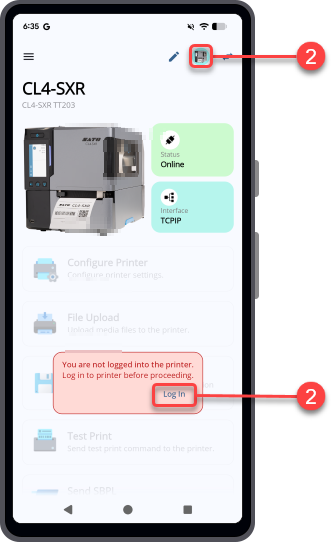
If you are not logged in to the printer, a dialog appears on the dashboard prompting you to log in.
2.
Tap [Log in] or the printer icon to open the Printer Connection and Access panel.
3.
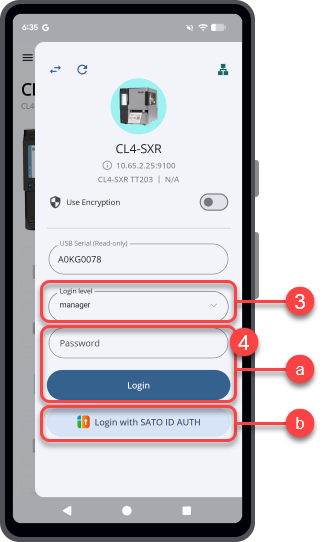
On the Printer Connection and Access panel, select the [Login level].
4.
Do one of the following:
(a) To sign in using the factory-provided password
Enter the password, and then tap [Login].
 
(b) To sign in using a SATO ID AUTH account
Tap [Login with SATO ID AUTH].
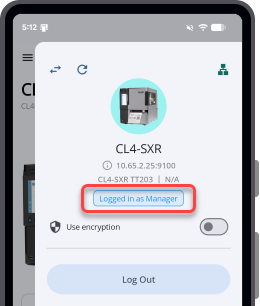
After you successfully sign in, the Printer Connection and Access panel refreshes and displays the updated login status.
 
•
Swipe right to close the Printer Connection and Access panel.
 

Related Topics
Dashboard Overview

Top

Back

© 2026 SATO Corporation. All rights reserved.