TOP > Getting Started > Printer Login > Log In to the Printer Using the NFC Interface
Log In Using the Default Password From SATO ID AUTH
1.
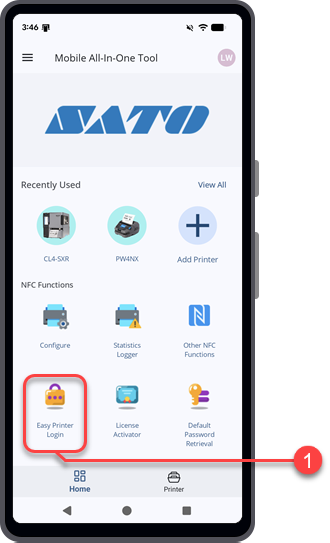
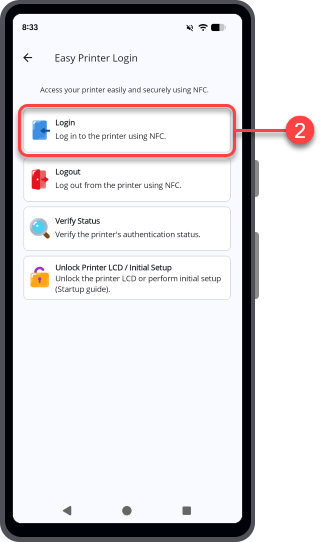
On the [Home] page, tap [Easy Printer Login].
2.
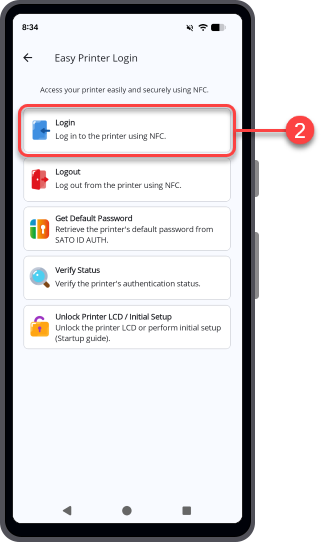
Tap [Login].
3.
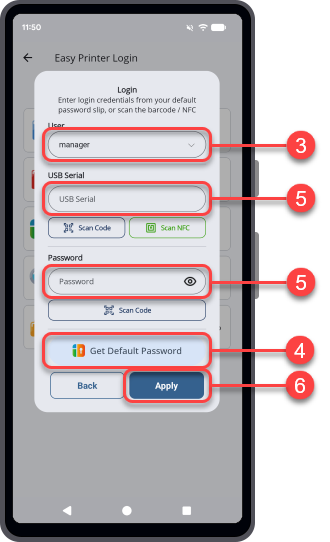
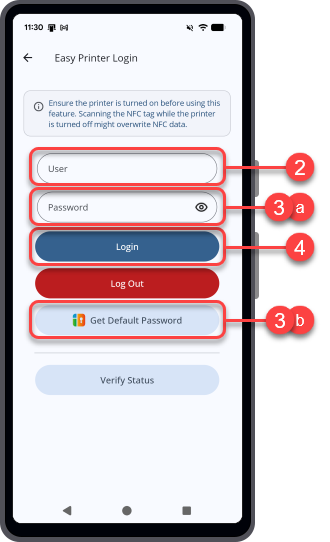
On the [Login] dialog, select an available [User] access level.
4.
Tap [Get Default Password].
For global users: Global Helpdesk.
For users in Japan: Japan Helpdesk.
6.
Tap [Apply].
Log In by Providing the Printer Password
1.
On the [Home] page, tap [Easy Printer Login].
2.
Tap [Login].
3.
On the [Login] dialog, enter the [User] access level.
4.
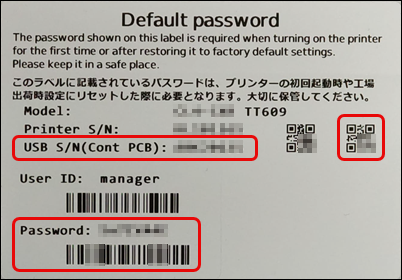
Enter the [USB Serial] number.
◦
If you have the Default password label that comes with the printer package, tap [Scan Code] and scan the QR code for the USB serial number.
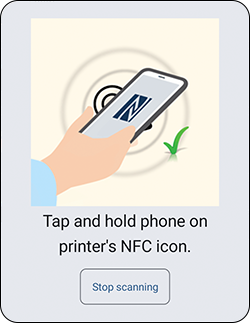
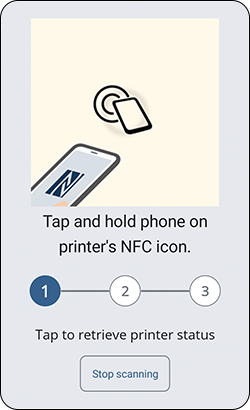
Tap [Scan NFC] and hold the Android device or iPhone close to the printer's NFC antenna. The NFC antenna location is marked with a symbol.
◦
For global users: Global Helpdesk.
For users in Japan: Japan Helpdesk.
6.
Tap [Apply].
 

Top

Back